Product feedback survey: 5 questions that tell you what to build next
You ship features, run campaigns and publish posts, and still the numbers barely move. Usually the problem is not effort. It is that you are working hard on things that matter less to your users. A product feedback survey, or product review, asks them directly: how much would they miss your product, what do they value, and what would they change?
This guide covers when to send it and to whom, the five questions to ask and what each one tells you, and how to turn the answers into decisions about what to build next.
Key takeaways
- A product feedback survey, or product review, steps back from the day-to-day and asks your users what they think of your product as a whole: how much they would miss it, what they value most, and what one thing they would change.
- Send it when a user has had time to form an opinion, about two weeks to a month after they sign up, and then again every three to six months, so you can see how their view changes as your product does.
- Five questions are enough. The most useful ones are open, and they work best when people can answer by voice or show you on screen, with an AI that can ask a follow-up.
- Read the good answers as carefully as the bad ones. What users love is often what makes your product different, and doubling down on it is often what drives most of your growth.
- Look behind the requests. When seven out of ten users ask for a PDF export, the need may not be the PDF. It may be a way to share their work with a colleague.
Why you need the big picture
If you run a startup, you probably spend your days doing one of two things: building the product, or getting it in front of more people. So you ship another feature, run another campaign, publish another post, and hope that this is the one that makes the numbers move. For a lot of teams, it never quite does. Not because they are not working hard enough, but because they are working hard on the wrong things.
The fastest-growing startups do something different. They do not treat growth as a straight line from building to selling. They treat it as a loop: build, get users, learn from those users, and use what they learn both to improve the product and to find more people like them. Every time the loop goes round, the next release is a little less of a guess.
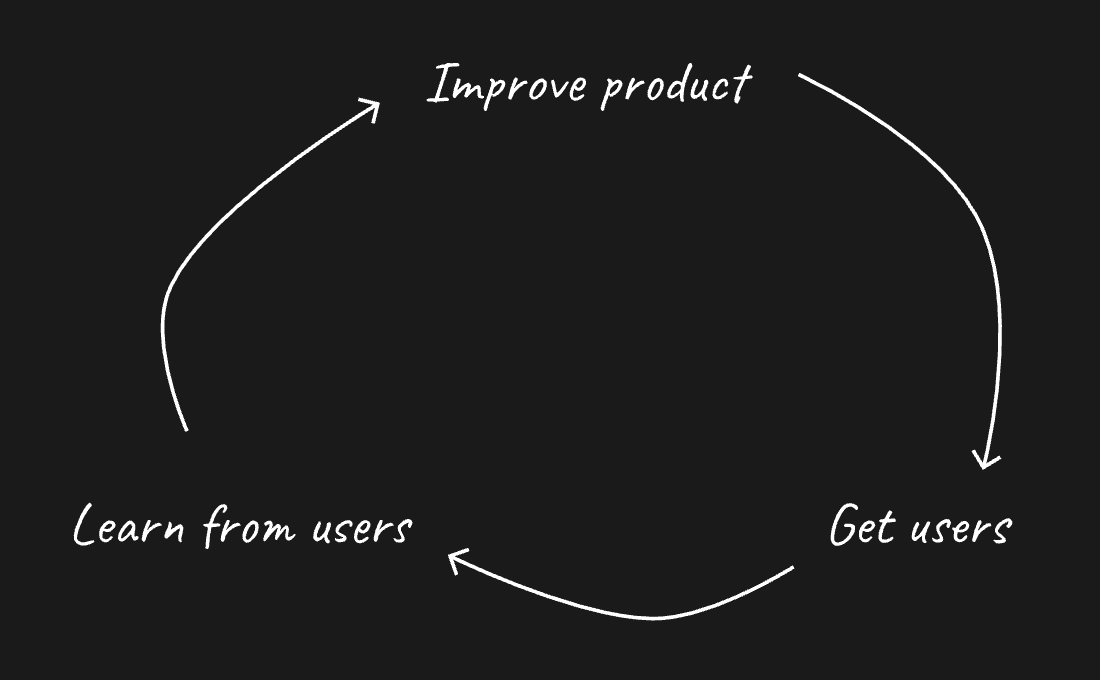
You probably already hear from users through support tickets, and maybe through a feedback button inside the product. That tells you a lot about the moments when something goes wrong. What it does not tell you is the big picture. Does your product actually matter to the people using it? What do they value so much that they would be upset to lose it? And what is the one thing standing between them and loving it?
Those are the questions a product feedback survey answers. And sometimes a single good answer changes more than any feature you could ship.
What a product feedback survey is
A product feedback survey is a short set of questions that asks your users to step back and look at your product as a whole. We often call it a product review, because that is what it is: a regular check-in on how your product is doing in the eyes of the people who use it.
It is easiest to understand next to the other ways of hearing from users. In-app feedback catches the moment something goes wrong. A survey about one feature tells you whether that feature works. A product review zooms out and tells you how the whole thing fits into your users’ lives.
| Method | What it tells you | When you use it |
|---|---|---|
| Product review | How much users value the product, why, and what would make it better | After the first weeks, then every three to six months |
| In-app feedback | Bugs, confusion and ideas, at the moment they happen | All the time, whenever a user has something to say |
| Journey feedback | Why people drop off at one step, such as signup, onboarding or cancelling | When your numbers show a problem at that step |
| NPS | How likely users are to recommend you, as a number, but rarely why | Often alongside a product review |
If you have heard of the product-market fit survey, the product review will look familiar. It borrows that survey’s best question, how disappointed people would be without your product, and builds around it. Our guide to the product-market fit survey goes deep on scoring that one question. This guide is about the regular review your whole team learns from.
When to send it, and to whom
Ask too early, and users have nothing to say yet. Ask too rarely, and you miss the moment when something starts to slip. So a good rhythm has two parts.
The first review should go out once a user has had time to form a real opinion, usually two weeks to a month after they sign up. By then they have tried the product in their actual work, they know what it does well, and they have run into its limits.
After that, ask again every three to six months. Your product changes, your users’ needs change, and the answers you got in spring may not hold in autumn. Asking regularly turns the review from a one-off snapshot into a trend you can watch, which is far more useful when you are deciding what to build next.
As for who to ask, send it to people who actually use the product. Someone who signed up and never came back cannot tell you much about what they value. Their story belongs in a different conversation, about why they left.
The questions to ask
So which questions should you ask? Five are enough. Every extra question costs you answers, and the ones that matter most are open questions that take a moment of thought. Our product review template uses the five below, plus an optional email field so you can follow up. Each one has a job.
- 1
“How long have you been using [product]?”
It lets you read the answers by experience. Someone in their first month and someone in their second year see your product very differently, and both views matter.
Multiple choice
- 2
“How would you feel if you could no longer use [product]?”
Offer four answers: very disappointed, somewhat disappointed, not disappointed, and I no longer use it. This is the question Sean Ellis made famous as a test for product-market fit, and it is the closest thing a survey has to a pulse. Let an AI ask one follow-up about the choice, so you hear what exactly they would miss.
Multiple choice
- 3
“What is the main benefit you get from [product]?”
A lot of people forget to ask this, and it might be the most valuable question of all. It tells you where your product creates value today, in your users’ own words. If they stay vague, an AI follow-up can ask for a concrete example.
Best spoken
- 4
“If you could change one thing about [product], what would it be?”
Asking for one thing forces a choice, and the choice tells you what matters most. Invite people to share their screen and show you. An AI follow-up can ask what difference the change would make to their work.
Screen share
- 5
“Anything else you want us to know?”
An open door at the end. Some of the most surprising answers come from here, because people finally get to say what your questions did not think to ask.
Best spoken
Depending on your product, it can also help to add a question about the person answering. For a B2B product, that is often their role, so you can tell the view of the person who uses your product every day from the view of the person who chose it. For a consumer product, it might be what they mainly use it for.
Notice what is not on the list: a long series of rating scales. A score from one to ten tells you that something changed, but not why, and it is the why you need to decide what to do. The why comes from the open questions, and people give you more of it when they talk. They say about three times as much when they talk as when they type, according to a 2024 study with 1,001 people. And a follow-up question gets you the part that even a long first answer leaves out.
What to do with the answers
A product review gives you a lot of opinions at once, and it is tempting to try to act on all of them. Here is how to turn them into decisions instead.
Start by looking for patterns, not individual requests. People will tell you many different things, and you cannot build them all. That is fine. What you are looking for is what comes up again and again. Ask your AI to group the answers by theme and count how often each one appears, and the handful of things worth your time will stand out quickly.
Then read the good answers as carefully as the bad ones. The natural instinct is to go straight to the complaints and fix every one of them. But if you only fix complaints, you end up building a product that tries to please everyone, and that is not how you grow. The answers to “what is the main benefit you get?” tell you what makes your product different. Protecting that, and making it even better, is often what drives most of your growth. It sounds backwards, but doubling down on what already works is one of the best moves you can make.
Finally, look behind the requests to the need underneath. Users are good at describing their problems and less good at designing the solution. Say seven out of ten people ask for a way to export a report as a PDF. That is a clear pattern, and you should take it seriously. But the need is probably not the PDF. It is that they need to share what they found with a colleague, and a link they can send might solve that better than any file.
It also helps to read the answers by group. Compare the people who would be very disappointed without your product with everyone else. The first group tells you what to protect and who your product is really for. The second tells you what is holding the rest back. And when a few recordings capture a theme especially well, share them with your team. Hearing a user explain a problem in their own words convinces people in a way no summary can.
How Superhuman turned the answers into a plan
The best-known example of this comes from Superhuman, the email app. In 2017, its founder, Rahul Vohra, sent users a short survey with the questions at the heart of this guide: how would you feel if you could no longer use Superhuman, what is the main benefit you get from it, and how could we make it better for you? Only 22% said they would be very disappointed, far below the 40% that Sean Ellis uses as the mark of product-market fit.
So the team read the answers by group. The users who would be very disappointed loved one thing above all: speed. Among the users who were only somewhat disappointed, the team listened most closely to the ones who also named speed as the main benefit, because they were the closest to loving the product. What held them back was, more than anything, the lack of a mobile app.
Then the team split its roadmap in two. Half of the work doubled down on what users loved: more speed, more keyboard shortcuts, more automation. The other half removed what held the rest back, starting with the mobile app. Within three quarters, the share of users who would be very disappointed without Superhuman went from 22% to 58%, as Vohra describes in First Round Review.
How to run it in Feedbaq
Feedbaq is built for exactly this kind of survey. A product review is only as good as the why behind each answer, and getting the why is what Feedbaq does best. You start from the product review template, with the five questions ready to go, and your users answer in their own time: they can talk, share their screen on desktop and show you, or type.
Add an AI follow-up to the questions where you want to dig deeper, and it asks about what that person just said, the way you would on a call. So you get the why without booking a single call. You can share the link in an email to your users, or open the survey inside your product, which can tell Feedbaq who is answering, with their plan and account. Every spoken answer is transcribed, and you can group the responses by a choice answer, so everyone who would be very disappointed sits together, just as Superhuman did.
And if you work with an AI agent, you can hand most of the work to it. Connect Claude, ChatGPT, Codex, Cursor or Grok to Feedbaq, and it can set up the survey for you, then read every answer and pull out the themes, quotes and patterns when the results come in.
Run your first one this week
You do not need a research team or a long plan to start. Here is how to run your first product review in a week.
- Pick your users. Choose the people who have used your product for at least a couple of weeks. If you can, note their plan, so you can compare groups later.
- Start from the template. The product review template has the five questions in order, with voice and screen answers and AI follow-ups where they help. If it helps, add a question about the person, such as their role.
- Send it. Email the link, or open it inside your product. Either way, people answer in a few minutes, when it suits them.
- Read it with your team. When the answers are in, look for the patterns, read what people love as closely as what they want changed, and pick the one or two things you will act on.
- Plan the next round. Put a date in the calendar three to six months out, so you can see what changed.
Building and previewing the survey in Feedbaq is free, so you can try every question yourself before a single user sees it. Collecting answers from real users costs $49 a month with every feature included. Then all that is left is to ask, and to listen.
Free template
The product review template
Six questions on how much people would miss your product, the main benefit they get, and the one change they would make.
Use this template, free- 1How long have you been using our product?Choice
- 2How would you feel if you could no longer use our product?Choice
- 3What is the main benefit you get from our product?Voice
- 4If you could change one thing about our product, what would it be?Screen share
- 5Anything else you want us to know?Voice
- and 1 more question
Questions people ask
What is a product feedback survey?
A product feedback survey, also called a product review, is a short set of questions that asks users what they think of your product as a whole: how much they would miss it, the main benefit they get, and the one thing they would change. It complements in-app feedback, which catches problems at the moment they happen.
When should you send a product feedback survey?
Send the first one when users have had time to form a real opinion, usually two weeks to a month after they sign up. Then ask again every three to six months, so you can see how their view changes as your product does.
What questions should a product feedback survey ask?
Five: how long they have used the product, how they would feel if they could no longer use it, the main benefit they get, the one thing they would change, and anything else they want you to know. Depending on your product, you can add a question about the person, such as their role.
How is a product feedback survey different from NPS?
NPS asks how likely people are to recommend you on a scale from 0 to 10, which gives you a number but rarely the reason behind it. A product feedback survey asks how much people would miss your product, what they value and what they would change, so you learn why and what to do next.
What should you do with the answers?
Look for patterns rather than single requests, read what users love as carefully as what they want changed, and look behind each request to the need underneath. Compare the users who would be very disappointed without your product with everyone else.
Is Feedbaq free?
Building and previewing studies in Feedbaq is free, including from your AI agent. Collecting responses from real users costs $49 a month with every feature included.
Keep reading
Want to score the disappointment question properly? Our guide to the product-market fit survey covers sample sizes, segments and what each score means.
The 7 best product feedback survey tools in 2026 that tell you what to build next
Seven product feedback survey tools checked against ten criteria: voice and screen answers, AI follow-ups, the participant experience, templates, MCP and price.
Read the guideThe product-market fit survey: how to run the Sean Ellis test
How to run a product-market fit survey: the Sean Ellis question, who to ask, how many answers you need, and how to score, segment and act on the result.
Read the guide